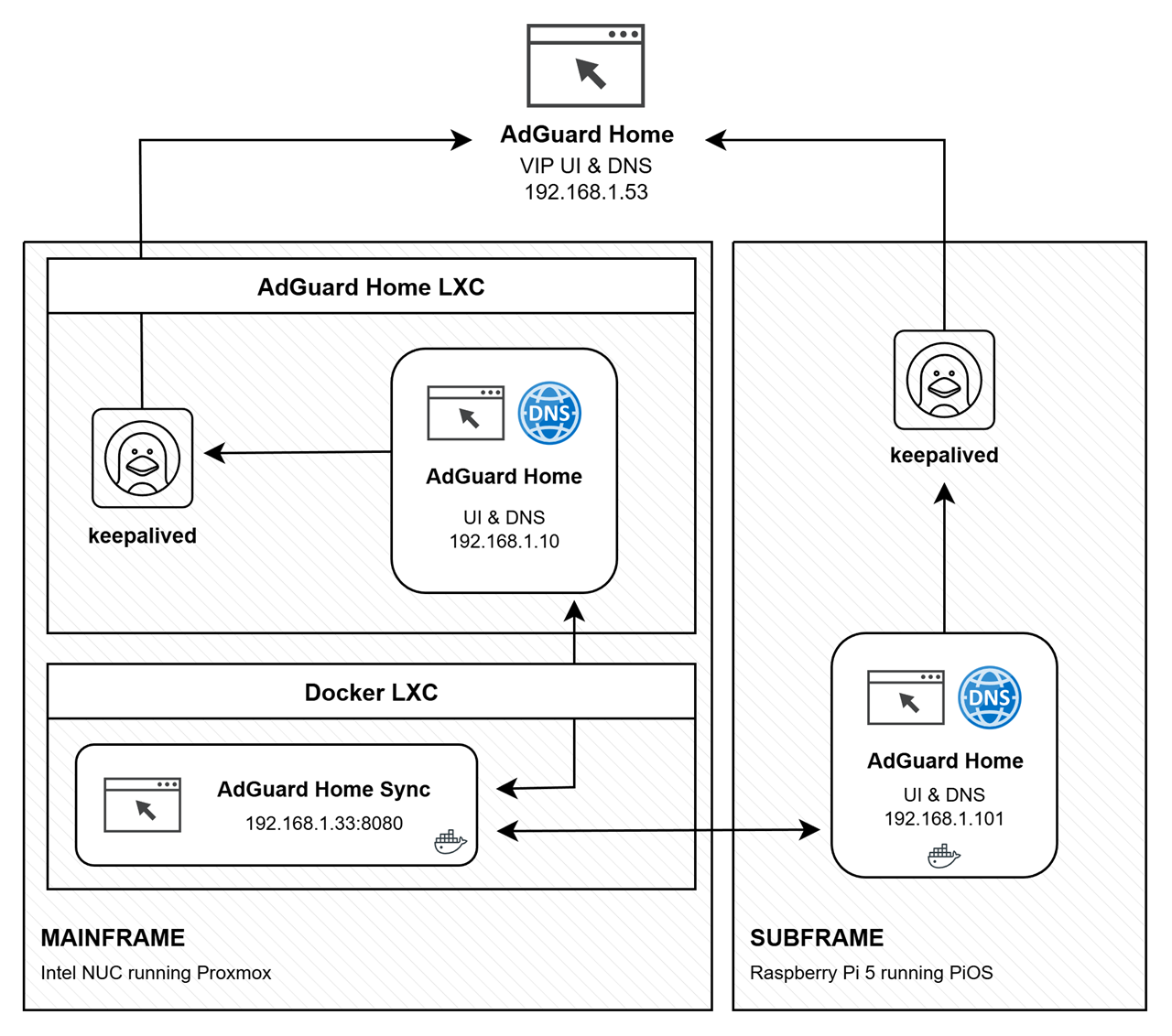
I use AdGuard Home as my DNS (and DHCP) Server. This guide will help you configure Keepalived to provide a floating VIP for high availability between two AdGuard Home nodes: a privileged LXC (Master) and a privileged Docker container (Backup). It includes a health check script to ensure the VIP only moves if AdGuard Home is actually running.
VIP: 192.168.1.53
Master: 192.168.1.10 (LXC on Proxmox)
Backup: 192.168.1.101 (Docker on Raspberry Pi 5)
📦 Installation
Install Keepalived and Dependencies
Optional:
- Remove unnecessary packages if running minimal containers:
apt autoremove -y
Create Health Check Script On Both Nodes
- File:
/usr/local/bin/check_adguard.sh - Example content:
1
2
3
4
5
6
7
8
9
10
11
12
13
14
15
16
17
| #!/bin/bash
UI_URL="http://127.0.0.1"
DNS_TEST="127.0.0.1"
# 1. Check UI
if ! curl -fs --max-time 2 "$UI_URL" > /dev/null; then
echo "AdGuardHome UI not reachable."
exit 1
fi
# 2. Check DNS IPv4
if ! nc -zu -w2 "$DNS_TEST" 53 > /dev/null 2>&1; then
echo "AdGuardHome DNS not responding."
exit 1
fi
exit 0
|
- Make it executable:
chmod +x /usr/local/bin/check_adguard.sh - Test manually:
/usr/local/bin/check_adguard.sh && echo OK || echo FAIL
- File:
/etc/keepalived/keepalived.conf - Add at the top:
1
2
3
4
| global_defs {
script_user root
enable_script_security
}
|
- Ensures health check script has permissions to run.
Define Health Check in Keepalived
- Add the following outside vrrp_instance:
1
2
3
4
5
| vrrp_script chk_adguard {
script "/usr/local/bin/check_adguard.sh"
interval 5 # Run every 5 seconds
weight -20 # Reduce priority if check fails
}
|
1
2
3
4
5
6
7
8
9
10
11
12
13
14
15
16
17
18
19
20
21
| vrrp_instance VI_1 {
state MASTER
interface eth0 # Adjust to Interface
virtual_router_id 35
priority 100 # Higher = Master
advert_int 1 # Advertisement interval in seconds
authentication {
auth_type PASS
auth_pass 12345678 # Must match Backup
}
virtual_ipaddress {
192.168.1.53 # Floating VIP
}
track_script {
chk_adguard # Reference Health Check
}
unicast_src_ip 192.168.1.10
unicast_peer {
192.168.1.101
}
}
|
1
2
3
4
5
6
7
8
9
10
11
12
13
14
15
16
17
18
19
20
21
| vrrp_instance VI_1 {
state BACKUP
interface eth0 # Adjust to Interface
virtual_router_id 35
priority 90 # Lower = Backup
advert_int 1
authentication {
auth_type PASS
auth_pass 12345678 # Must match Master
}
virtual_ipaddress {
192.168.1.53 # Floating VIP
}
track_script {
chk_adguard # Reference Health Check
}
unicast_src_ip 192.168.1.101
unicast_peer {
192.168.1.10
}
}
|
Enable and Start Keepalived
On both nodes:
- Enable service:
systemctl enable keepalived - Start service:
systemctl start keepalived
Verify VIP is assigned:
ip addr show eth0 | grep 192.168.1.53
Test failover:
- Stop master Keepalived:
systemctl stop keepalived - Backup should take VIP automatically.
Set DCHP Option 6 to VIP
On both nodes:
- File:
/opt/AdGuardHome/AdGuardHome.yaml - Add:
1
2
3
4
5
| dhcp:
enabled: true
[...]
options:
- 6 ips 192.168.1.53
|
- Ensures VIP is sent has the DNS server.
Optional Cleanup
✅ Completion Note
- Keepalived installed and configured on both nodes.
- Floating VIP 192.168.1.53 active only if AdGuard services are running.
- Health check script ensures automatic failover if AdGuard UI or DNS fails.
- Persistent configuration provides high availability for your DNS/DHCP services.
🗑️ Uninstall / Revert Keepalived HA Setup
This section explains how to safely remove Keepalived, the health check script, and revert the VIP configuration on both nodes.
Stop Keepalived Service
- On both Master (LXC) and Backup (Docker container):
1
2
| systemctl stop keepalived
systemctl disable keepalived
|
- Stops Keepalived immediately
- Disables automatic start on boot
Remove Health Check Script
- Delete the script from both nodes:
1
| rm -f /usr/local/bin/check_adguard.sh
|
- Optional: verify removal:
1
| ls -l /usr/local/bin/check_adguard.sh
|
- Should return no such file
Remove VIP from Network Interface
- On both nodes, if the VIP is still assigned:
1
| ip addr del 192.168.1.53/24 dev eth0
|
- Replace
eth0 with the actual network interface if different - Verify removal:
1
| ip addr show eth0 | grep 192.168.1.53
|
- Should return nothing if successfully removed
Remove Keepalived Package
1
| apt remove --purge keepalived -y
|
- Removes Keepalived and its configuration files
- Optional cleanup:
Optional Docker Cleanup (Backup Node)
- Remove any lingering Docker containers/images if Keepalived ran inside a container:
1
2
3
| docker rm -f keepalived
docker rmi -f keepalived-image-name
docker system prune -f
|
✅ Completion Note
- Keepalived service removed and disabled
- Health check script deleted
- Floating VIP 192.168.1.53 removed from all interfaces
- System restored to pre-HA state without affecting AdGuardHome installation